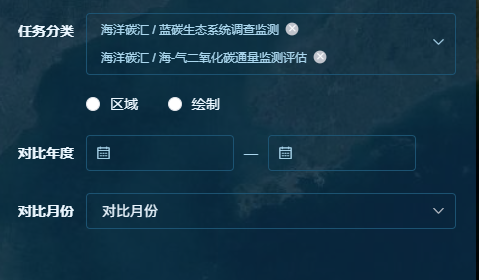
Appearance
修改Element Comp默认样式的方法
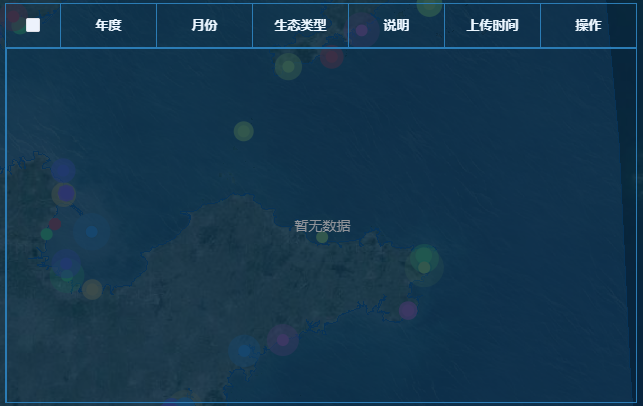
Table 表格
- 修改背景
- 边框
 <el-table
    ref="table"
    :data="tableData"
    style="
      width: 100%;
      height: 100%;
      background: transparent;
      border-color: rgba(43, 124, 181, 1) !important;
    "
    :header-cell-style="{
      background: 'transparent',
      color: 'rgba(235, 246, 255, 1)',
    }"
    :cell-style="{ background: 'transparent', color: 'rgba(235, 246, 255, 1)' }"
    border
  >
  </el-table>


  ::v-deep .el-table__row {
  background: transparent !important;
  & > td {
    border-color: rgba(43, 124, 181, 1) !important;
  }
}
::v-deep .has-gutter tr {
  background: transparent !important;
  & > th {
    border-color: rgba(43, 124, 181, 1) !important;
  }
}

::v-deep .el-table__body-wrapper {
  border: 1px solid rgba(43, 124, 181, 1);
  height: calc(100% - 44px);
  overflow-y: auto !important;
}
.el-table::before {
  display: none;
}

.el-table::after {
  display: none;
}
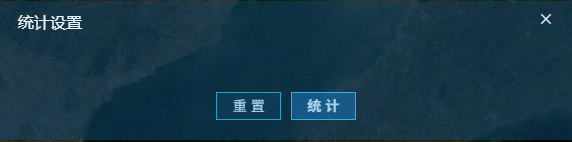
Dialog 对话框
::v-deep .el-dialog {
  background: rgba(13, 60, 97, 0.6) !important;
  .el-dialog__header {
    border: none;
    color: rgba(236, 247, 255, 1);
    .el-dialog__headerbtn {
      .el-dialog__close {
        color: rgba(236, 247, 255, 1);
      }
    }
  }
  .el-dialog__footer {
    display: flex;
    justify-content: center;
    .el-button {
      color: rgba(171, 215, 238, 1);
      padding: 0.7vh 0.8vw;
    }
    .el-button:first-child {
      background: rgba(17, 63, 94, 0.7);
      border-radius: 2px;
      border: 1px solid;
      border-image: linear-gradient(55deg, #2a9fc5, #2a9fc5) 1 1;
    }
    .el-button:last-child {
      background: rgba(26, 124, 198, 0.5);
      border-radius: 2px;
      border: 1px solid;
      border-image: linear-gradient(55deg, #2bb2de, #2bb2de) 1 1;
    }
  }
  .el-dialog__body {
    padding-top: 10px;
    .container {
      .title {
        font-family: Microsoft YaHei;
        font-weight: 400;
        color: #e5f8ff;
        margin-bottom: 1.5vh;
      }
      .tab-container {
        display: flex;
        color: rgba(211, 234, 245, 1);
        div {
          background: rgba(40, 104, 149, 0.3);
          padding: 0.5vh 0.5vw;
          cursor: pointer;
        }
        .active-tab {
          font-family: Microsoft YaHei;
          font-weight: 400;
          color: #ffffff;
          background: rgba(29, 180, 251, 0.3);
        }
        .loading-overlay {
          width: 100%;
          height: 100%;
          background: transparent !important;
          .el-loading-mask {
            background: transparent !important;
          }
        }
      }
      .btn-container {
        display: flex;
        justify-content: end;
        .el-button {
          color: rgba(83, 218, 255, 1);
        }
      }
    }
  }
}
Form 表单
::v-deep .el-form {
  // 更改每一项label字体颜色
  .el-form-item__label {
    color: rgba(236, 247, 255, 1);
  }
  // 更改多种表单组件的背景颜色、边框、伪元素 (input、select、date.....)
  .el-input__inner {
    background: transparent !important;
    border: 1px solid rgba(30, 86, 119, .9) !important;
    &::placeholder {
      color: rgba(236, 247, 255, 1);
    }
  }
  // 更爱单选字体颜色
  .el-radio__label {
    color: rgba(236, 247, 255, 1);
  }
  // 更改按钮样式
  .el-button {
      color: rgba(171, 215, 238, 1);
      padding: 0.7vh 0.8vw;
      background: rgba(17, 63, 94, 0.7);
      border-radius: 2px;
      border: 1px solid rgba(3, 134, 223, 0.50);
  }
  // 更改时间组件的icon
  .el-date-editor {
    span {
       color: rgba(171, 215, 238, 1);
    }
  }
  // 更改级联选择 选中的标签颜色
  .el-cascader {
    .el-tag {
      background: transparent !important;
    }
  }
}