Appearance
模板
渲染函数
- Vue里单文件组件是会被一个模板编译器进行编译的, 编译后的结果不存在什么模板,而是把模板编译为渲染函数的形式。
- 所以完全可以使用纯JS来书写组件,文件内部直接调用渲染函数来描述组件视图。
- Vue之所以提供模板的方式,是为了让开发者的描述视图的时候更加轻松。 Vue在运行时本身不需要模板,只需要渲染函数,调用渲染函数后得到虚拟DOM。
模板编译
- 单文件组件中书写的模板,对于模板编译器来讲,就是普通的字符串。
- 下面是模板内容:
<template>
	<div>
  	<h1 :id="someId">Hello</h1>
  </div>
</template>- 对于模板编译器而言,就是个字符串:
'<template><div><h1 :id="someId">Hello</h1></div></template>'- 模板编译器对上面的字符串进行操作,最终生成结果:
function render(){
  return h('div', [
    h('h1', {id: someId}, 'Hello')
  ])
}
模板编译器对模板字符串进行编译的时候是一步一步转换而来:
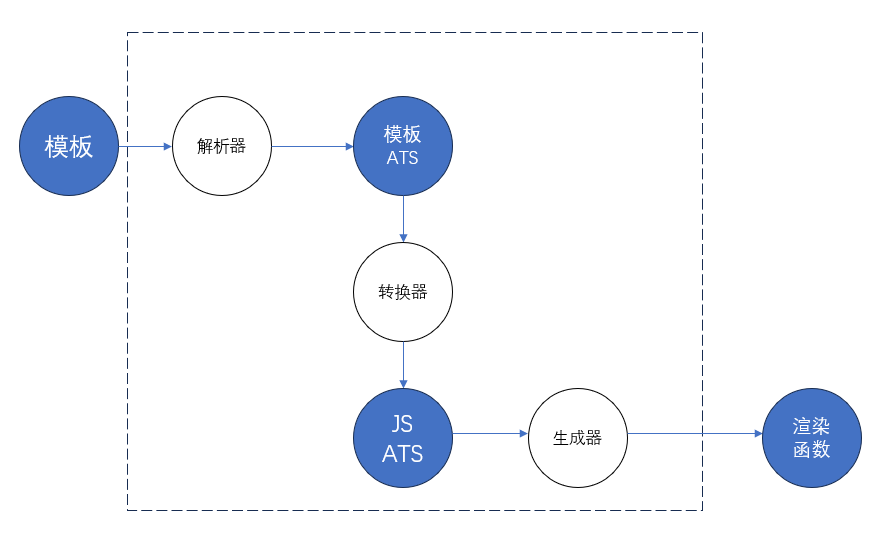
- 解析器:将模板字符串解析为模板AST
- 转换器:将模板AST转换为 JS AST
- 生成器:将JS AST 生成最终的渲染函数
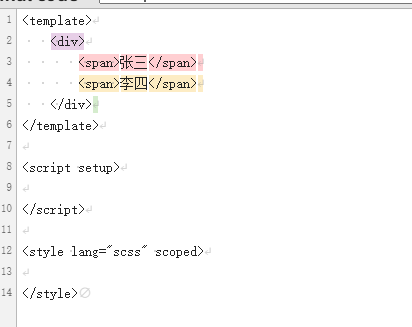
<div>
    <span>张三</span>
    <span>李四</span>
</div>
上面这段代码 对于模板编译器而言 就是一个字符串:
"<div><span>张三</span><span>李四</span></div>"首先解析器拿到这个字符串进行解析,得到一个一个token
[
    {"type":"tag","name":"div"},
    {"type":"tag","name":"span"},
    {"type":"text","content":"张三"},
    {"type":"tagEnd","name":"span"},
     {"type":"tag","name":"span"},
    {"type":"text","content":"李四"},
    {"type":"tagEnd","name":"span"},
    {"type":"tag","name":"div"}
]
解析器还需要根据得到的token来生成抽象语法树(模板AST)
{
  "type": "Root",
  "children": [
    {
      "type": "Element",
      "tag": "div",
      "children": [
        {
          "type": "Element",
          "tag": "span",
          "children": [
              {
                "type": "Text",
                "content": "张三"
              }
          ]
        },
        {
          "type": "Element",
          "tag": "span",
          "children": [
              {
                "type": "Text",
                "content": "李四"
              }
          ]
        }
      ]
    }
  ]
}
然后通过转换器将上面的模板AST转换为JS AST
{
  "type": "FunctionDecl",
  "id": {
      "type": "Identifier",
      "name": "render"
  },
  "params": [],
  "body": [
      {
          "type": "ReturnStatement",
          "return": {
              "type": "CallExpression",
              "callee": {"type": "Identifier", "name": "h"},
              "arguments": [
                  { "type": "StringLiteral", "value": "div"},
                  {"type": "ArrayExpression","elements": [
                        {
                            "type": "CallExpression",
                            "callee": {"type": "Identifier", "name": "h"},
                            "arguments": [
                                {"type": "StringLiteral", "value": "span"},
                                {"type": "StringLiteral", "value": "张三"}
                            ]
                        },
                        {
                            "type": "CallExpression",
                            "callee": {"type": "Identifier", "name": "h"},
                            "arguments": [
                                {"type": "StringLiteral", "value": "span"},
                                {"type": "StringLiteral", "value": "李四"}
                            ]
                        }
                    ]
                  }
              ]
          }
      }
  ]
}
最后就是生成器,根据上面的JS AST 生产具体的JS代码:
function render(){
    return h('div',[h('span','张三'),h('span','李四')])
}
模板编译器的大致结构:
function complie(template){
    // 1. 解析器
    const ast = parse(template)
    // 2. 转换器:将模板 AST 转换为 JS AST
    transform(ast)
    // 3. 生成器
    const code = genrate(ast)
    return code;
}
编译时机
- 运行时编译: 通过使用CDN的方式引入Vue,模板编译是在运行时进行的。
- 预编译: 发生在工程化环境下,工程化打包的过程中就完成了模板编译的工作,浏览器拿到的是打包后的代码,是完全没有模板的。
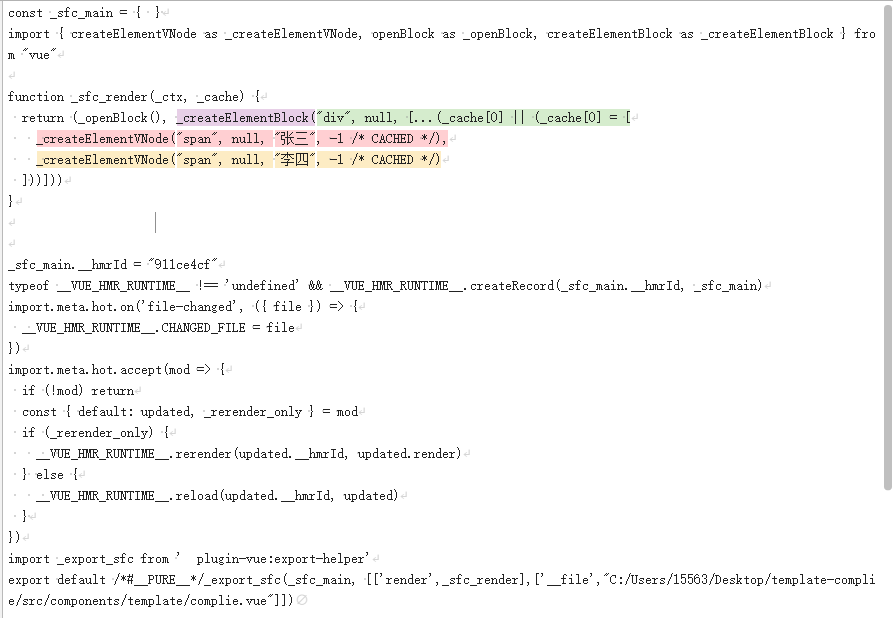
vite-plugin-inspect 通过这个插件 就可以看到每一个组件编译后的结果

在vite.config.js配置文件中需要配置一下:

// vite.config.js
import Inspect from 'vite-plugin-inspect'

export default {
  plugins: [
    Inspect()
  ],
}
组件编译前:
组件编译后: